HTML & CSS Praxis Test Notizen von Lars Hellstern
Allgemeine Theorie:
1. Grundstruktur einer HTML-Seite
<!DOCTYPE html>
<html lang="de">
<head>
    <meta charset="UTF-8">
    <meta name="viewport" content="width=device-width, initial-scale=1.0">
    <title>Meine Webseite</title>
</head>
<body>
    <h1>Überschrift</h1>
    <p>Dies ist ein Absatz.</p>
</body>
</html>
2. Überschriften & Textformatierung
<h1>Größte Überschrift</h1>
<h2>Etwas kleiner</h2>
<h3>Noch kleiner</h3>
<p><b>Fett</b>, <i>Kursiv</i>, <u>Unterstrichen</u></p>
<p><strong>Wichtig</strong>, <em>Betont</em></p>
3. Links (Hyperlinks)
<a href="https://example.com">Besuche meine Webseite</a>
<a href="seite.html" target="_blank">Öffne in neuem Tab</a>
4. Bilder einfügen
Bild5. Listen (geordnete & ungeordnete)
<ul> <!-- Ungeordnete Liste -->
    <li>Apfel</li>
    <li>Banane</li>
    <li>Kirsche</li>
</ul>

<ol> <!-- Geordnete Liste -->
    <li>Erster Punkt</li>
    <li>Zweiter Punkt</li>
    <li>Dritter Punkt</li>
</ol>
6. Tabellen
<table border="1">
    <tr>
        <th>Name</th>
        <th>Alter</th>
    </tr>
    <tr>
        <td>Max</td>
        <td>25</td>
    </tr>
    <tr>
        <td>Lisa</td>
        <td>22</td>
    </tr>
</table>
7. Formulare (Eingabefelder, Buttons)
<form action="submit.php" method="POST">
    <label for="name">Name:</label>
    <input type="text" id="name" name="name"><br>

    <label for="email">E-Mail:</label>
    <input type="email" id="email" name="email"><br>

    <input type="submit" value="Absenden">
</form>
8. Div & Span (Container für Layout)
<div style="background-color: lightgrey; padding: 10px;">
    Dies ist ein Block-Element (div)
</div>

<span style="color: red;">Dies ist ein Inline-Element</span>
Praxis Beispiele:
index.html
<!DOCTYPE html>
<!-- Erstellt          04.03.22
     Ersteller         Lars Hellstern
    -->
<html lang="de">
<head>
    <meta charset="UTF-8">
    <meta http-equiv="X-UA-Compatible" content="IE=edge">
    <meta name="viewport" content="width=device-width, initial-scale=1.0">
    <link rel="stylesheet" href="css/style.css">
    <script src="https://kit.fontawesome.com/1865631153.js" crossorigin="anonymous"></script>

    <title>Aufgabe 524</title>
</head>
<body>
    <main>
        <header>
            <h1><i class="fa-solid fa-bicycle"></i> Hello <span>World</span>!</h1>
        </header>
        <nav>
            <ul>
                <li><a href="#">Startseite</a><p>mit Zusatzinfo </p></li>
                <li><a href="#">Kontakt </a> <p>mit Zusatzinfo</p></li>
                <li><a href="#">Master Styles</a> <p>mit Zusatzinfo</p></li>
                <li><a href="#">Zurück </a> <p>mit Zusatzinfo</p></li>
            </ul>
        </nav>
        <section>
            <h2>Lorem Ipsum</h2>
            <p>Lorem ipsum dolor sit, amet consectetur adipisicing elit. Eos ullam fuga, molestiae
                illo facere soluta perferendis iure impedit iusto incidunt reiciendis distinctio maiores
                voluptate quo, et, totam nulla labore. Laudantium mollitia
                provident fugiat cum tenetur sit veritatis earum! Inventore illum, sit asperiores earum nihil cum.</p>
            <h2>Tabelle</h2>
            <table>
                <thead>
                    <tr>
                        <th>Nr.</th>
                        <th>Künstler</th>
                        <th>Album</th>
                        <th>Songs</th>
                    </tr>
                    <tr>
                        <td>01</td>
                        <td>Giorgio Conte</td>
                        <td>Italian Café</td>
                        <td>Lorem Ipsum <br>Dolor sit atem <br> Conseteteur <br> Et justo duo</td>
                    </tr>
                    <tr>
                        <td>02</td>
                        <td>Maria de Baros</td>
                        <td>Women of Africa</td>
                        <td>Mi Nada Lorem Ipsum</td>
                    </tr>
                    <tr>
                        <td>03</td>
                        <td>Stefano Puzzi</td>
                        <td>Livin la vidia</td>
                        <td>Dolor sit atem </td>
                    </tr>
                    <tr>
                        <td>04</td>
                        <td>Morris Viking</td>
                        <td>Let me go</td>
                        <td>Lorem Ipsum </td>
                    </tr>
                </thead>
            </table>
        </section>
        <footer>
            <p>
                <i class="fa-solid fa-address-card"></i> Anna Muster | Hauptstrasse 50 | 3000 Bern |
                <a href="https://twitter.com/" target="_blank" rel="noopener"> <i class="fa-brands fa-twitter"></i></a>|
                <a href="https://www.instagram.com/" target="_blank" rel="noopener"> <i class="fa-brands fa-instagram"></i></a>
                 | <a href="https://www.linkedin.com/feed/" target="_blank" rel="noopener"> <i class="fa-brands fa-linkedin">  </i></a>
            </p>
        </footer>
    </main>
</body>
</html>
style.css
@import url('https://fonts.googleapis.com/css2?family=Roboto&display=swap');

* {
    box-sizing: border-box;
    margin:0;
    padding:0;
    font-family: 'Roboto', sans-serif;
}

body{
    /* background-color:#3D3D3D;
    background-image: url(../img/pattern.png);*/
    background-image: url(../img/bild3.jpg);
    background-size: cover;
    background-repeat: no-repeat;
}

main {
    background-color: white;
    width: 80%;
    padding: 0 2em 2em 2em;
    margin: auto;
    margin-top: 2em;
}

nav, footer  {
    background-color: rgb(102, 103, 171);
}

header{
    background-color: white;
}
nav, section, footer {
    padding: 1em 2em 1em 2em;
    color: white;
}

section{background-color:#5E77E0;}

h1{font-size: 4em;
   padding: 0.5em 0 0.5em 0 ;}

p{padding-top: 0.5em; }

span{color: rgb(102, 103, 171)}

a:visited { color: white; }

nav {text-align: right;}

nav li{
    display:inline-block;
    height: 3.2em;
    width: 8em;
    background-color: #5E77E0;
    margin: 0.5em 0.1em;
    margin-left:0;
    text-align:left;
    padding: 0.5em;
}

nav li#aktuell{
    background-color: rgb(138, 139, 202);
    text-decoration: underline;
}

nav li:hover{
    background-color: rgb(138, 139, 202);
}

a{
    color:white;
    text-decoration: none;
    font-weight: bold;
}

nav p{
    color:white;
    font-size: 0.7em;
    margin:0;
}

h2{font-size: 1.3em;
   padding-top: 1em;
   padding-bottom: 0.5em; }

table{width: 100%;}

table, th, td{
    border:1px solid white;
    border-collapse: collapse;
    padding: 0.5em;
    vertical-align: top;
}

th{text-align: left;}
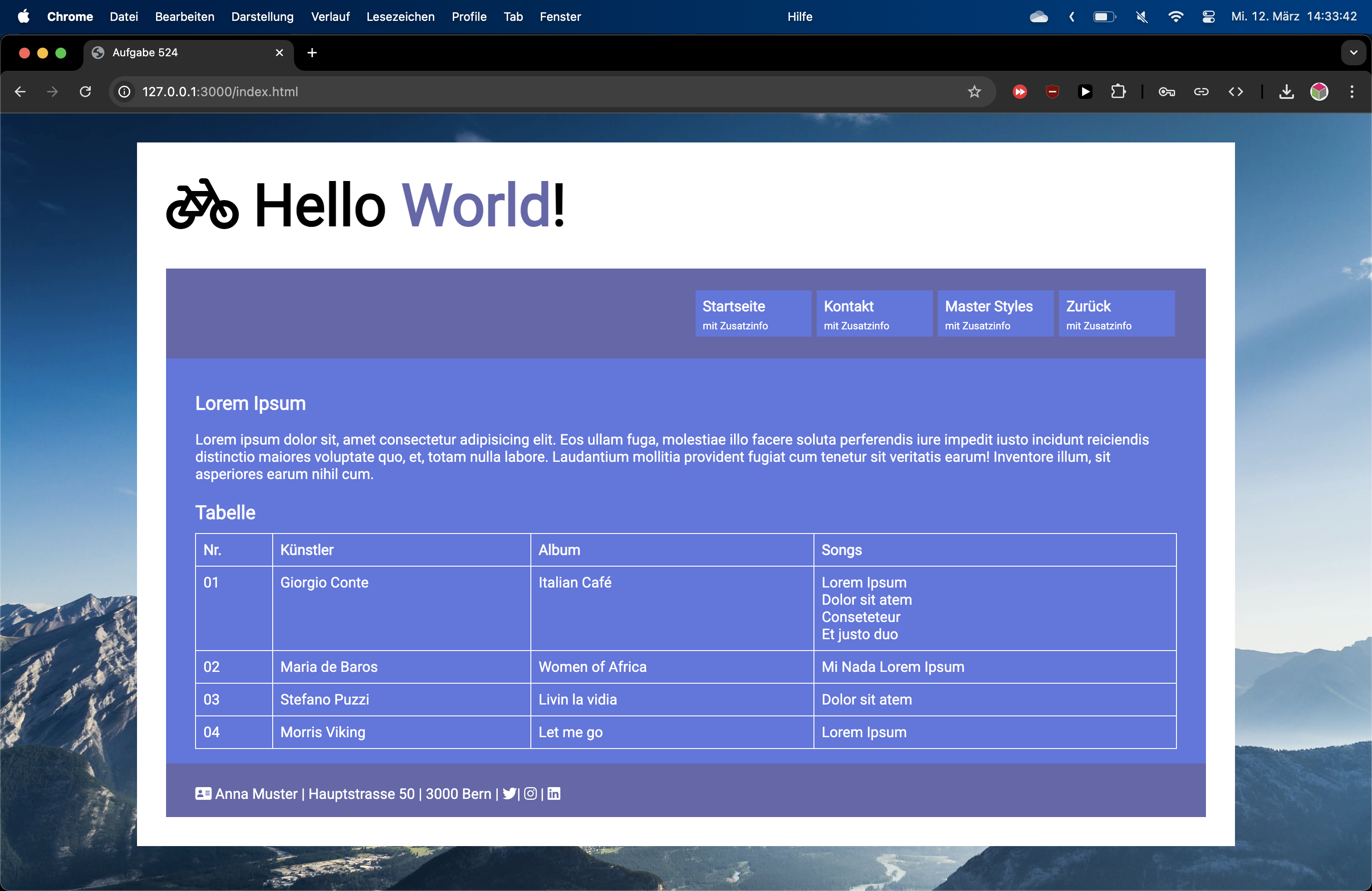
Ergebnis der Seite von Oben:
PDF-Dokument (HTML 1 von Doku KSB) anzeigen
Falls das PDF im docs/pdf/ Ordner liegt: